
|
|
|
|
|
Home
 Return
to the GraFit home page
Return
to the GraFit home page
Product Info
 Get information about the GraFit program
Technical Support
 Get technical support information about the GraFit program
Purchase
 Get information about purchasing GraFit software licenses
Download GraFit
 Download the GraFit program and program updates
Search
 Search the GraFit web site
Site map
 View the structure of the GraFit web site
About
 Get information about Erithacus Software
|
|
|
|
|
|
|||||||||||||||||||||||||||
|
Home |
Technical |
Sales |
Web Site |
|||||||||||||||||||||||||||||
The online store is the easiest way to purchase software and software updates
Registered users of earlier versions of GraFit are eligible for discounts when they upgrade to version 7 via the online store. You will need to enter your old registration code to qualify for discounted pricing.
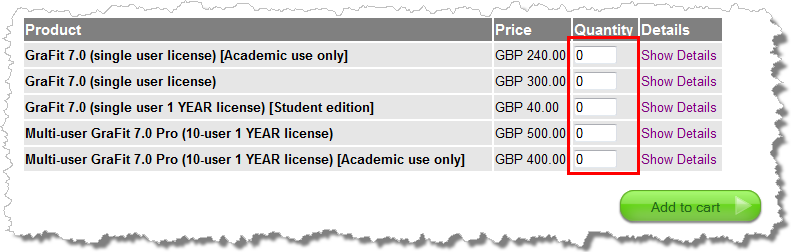 |
Enter the required quantities then click the Add to cart button.(Click to enlarge) |
When you are satisfied that the quantities are correct, click the Proceed to Checkout button.
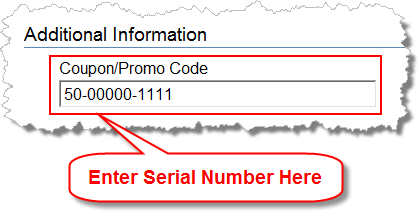 |
Enter your original version 5 or 6 serial number into the Coupon/Promo Code box. The serial number should start "50" for GraFit 5 or "60" for GraFit 6. In the case of version 5 there will be 3 parts, separated by hyphens; for version 6 there will be a single code without hyphens. You will only be allowed one upgrade per serial number.Click the Checkout button to continue to the next screen.(Click to enlarge) |
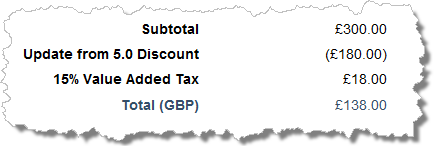 |
The final screen shows any discount that is applicable.Enter your credit card details and click Complete Purchase to finalize your order.(Click to enlarge) |
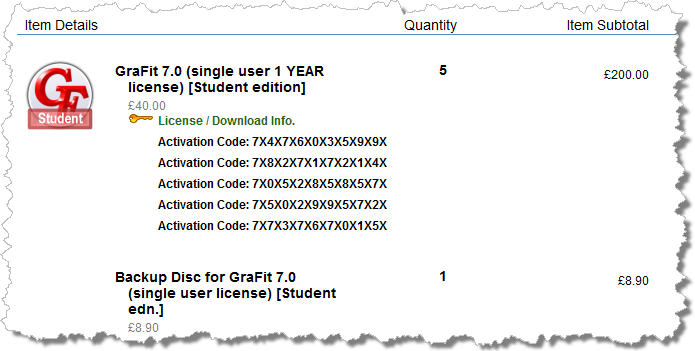 |
Once your order is complete you receive the order summary page. This includes your activation code(s) for you have purchased. These will also be sent to you by email along with a receipt for the transaction.(Click to enlarge) |
|
Terms of Use •
Privacy Policy •
Contact Us |

|
|
|
|
|




 Search
  Site map
  About
About  Go to the store