
|
|
|
|
|
Home
 Return
to the GraFit home page
Return
to the GraFit home page
Product Info
 Get information about the GraFit program
Technical Support
 Get technical support information about the GraFit program
Purchase
 Get information about purchasing GraFit software licenses
Download GraFit
 Download the GraFit program and program updates
Search
 Search the GraFit web site
Site map
 View the structure of the GraFit web site
About
 Get information about Erithacus Software
|
|
|
|
|
|
|||||||||||||||||||||||||||
|
Home |
Technical |
Sales |
Web Site |
|||||||||||||||||||||||||||||
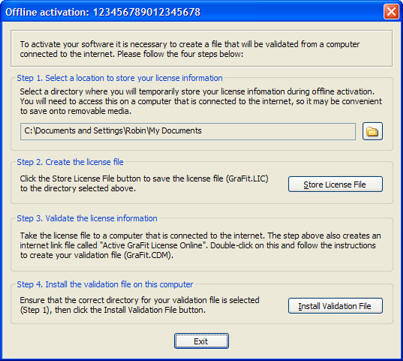
The Offline Activation process will allow you to activate GraFit on a computer that does not have a connection to the Internet. When you attempt to activate GraFit using your activation code, the program will attempt to validate this code online. In the event that your computer is not connected to the internet, you will need to take steps to validate the program by creating a license file on the computer that has GraFit installed and validating this on a different computer that does have internet access.
Note Offline activation is not compatible with multi-user licensing. This is because multi-user licenses require periodic connection to the internet in order to check that the license has not been revoked by the License Administrator.
|
Terms of Use •
Privacy Policy •
Contact Us |

|
|
|
|
|




 Search
  Site map
  About
About  Program
activation via the internet
Program
activation via the internet