
|
|
|
|
|
Home
 Return
to the GraFit home page
Return
to the GraFit home page
Product Info
 Get information about the GraFit program
Technical Support
 Get technical support information about the GraFit program
Purchase
 Get information about purchasing GraFit software licenses
Download GraFit
 Download the GraFit program and program updates
Search
 Search the GraFit web site
Site map
 View the structure of the GraFit web site
About
 Get information about Erithacus Software
|
|
|
|
|
|
|||||||||||||||||||||||||||
|
Home |
Technical |
Sales |
Web Site |
|||||||||||||||||||||||||||||

GraFit 6 uses by default an Office 2007-style ribbon bar to access the various commands. The ribbon bar combines the functionality of both toolbars and menu bars, which are used in more traditional Windows programs.
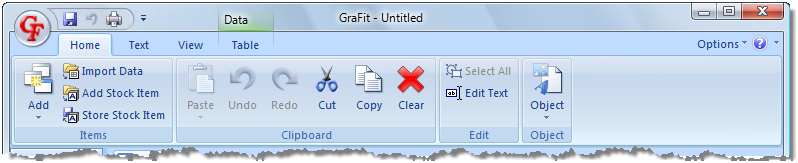 |
GraFit 6 using the Office 2007-style ribbon bar(Click to enlarge) |
The ribbon bar displays commands grouped on a series of tabs, giving a less cluttered layout than the traditional display, together with a "Quick Access Toolbar" that can be customized to hold commonly used commands in a consistent manner. The File menu is accessed via the GraFit logo button, found in the top left of the GraFit window.
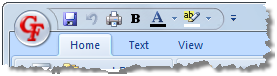
The Quick Access Toolbar can be used to hold any commands that you frequently access. In the example below, various formatting commands have been added.
It is also possible to run GraFit using a legacy-style combination of menu and toolbars, giving an appearance that is similar to GraFit version 5 and earlier. The legacy style may be preferred by existing users of the program.
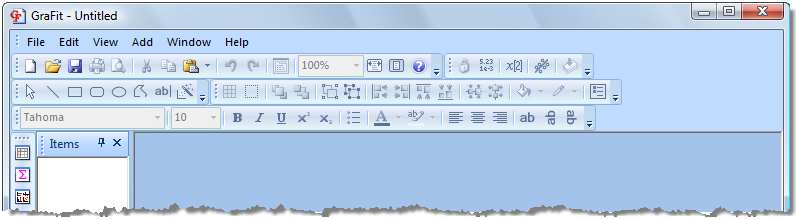 |
GraFit 6 using legacy-style menu and toolbars(Click to enlarge) |
|
Terms of Use •
Privacy Policy •
Contact Us |

|
|
|
|
|




 Search
  Site map
  About
About  Product information sheet
 Compare different GraFit versions